
A one-hour podcast episode, turned into ranked, captioned reels
How a video podcast goes from a long episode to captioned 9:16 clips, ranked by viral score, and how Two speakers keeps the question and the answer in the same frame.
50 free minutes to try it.
The situation
- A weekly video podcast runs 45 to 90 minutes. The best 30 seconds are in there somewhere, but finding them means watching the episode again.
- Most episodes have two people side by side, in a studio or on a Zoom or Riverside call. A normal 9:16 crop keeps one of them and cuts the other out, so the viewer hears a reaction without seeing who made it.
- Every clip then needs captions, a hook title and a thumbnail before it can go out.
What Reel Stack does with the video
- 1
Add the episode
Paste a YouTube link (or Google Drive, Dropbox and other video links) or upload an MP4, MOV or WebM file. If the video has captions, Reel Stack uses them; if not, it transcribes the speech.
IllustrationIllustration of the New clips page: paste a link or upload a file. - 2
Pick 9:16 and Two speakers
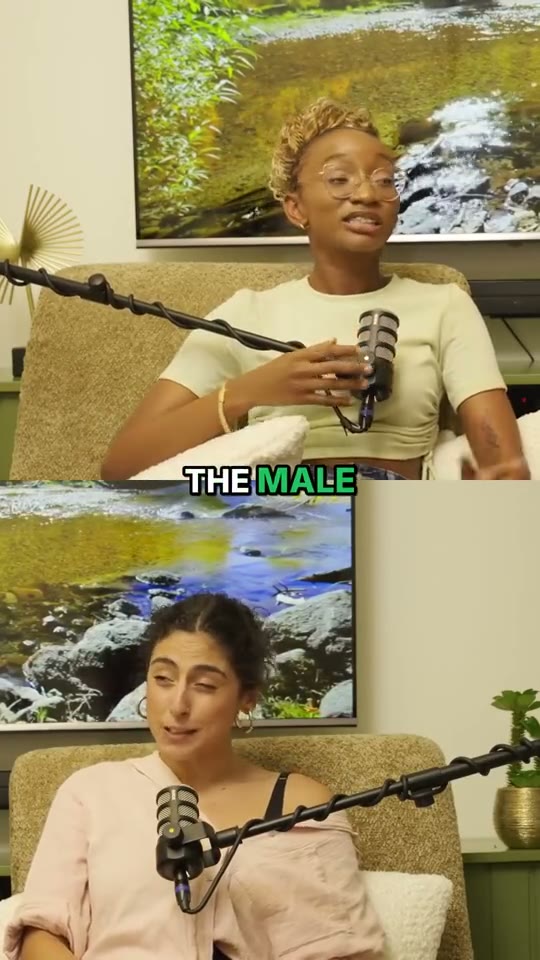
Two speakers puts the person on the left in the top half and the person on the right in the bottom half, each one tracked on their own. If the show cuts between a wide shot and close-ups, the clip splits on the wide shot and goes full screen on the close-ups, switching on the camera cut.
Included on Pro and Agency.
IllustrationIllustration of the Two speakers layout: both people stacked, captions on the seam. - 3
Let the score pick the moments
AI reads the whole transcript and proposes moments. Each one is scored on Stop (does the opening grab attention), Stay (pacing, energy and YouTube's Most replayed data when the video has it) and Share (is it worth sending to someone). You get up to 12 clips per video, 6 by default, shown strictly from the highest score down.
IllustrationIllustration of a clip card: the viral score and the “Why it goes viral” tab. - 4
Post
Each clip comes with word-by-word captions in one of five styles (Bold, Karaoke, Neon, Beast, Minimal), an AI hook title, the transcript, and a Thumbnail tab that makes an AI thumbnail when you ask for one.
IllustrationIllustration of the five caption styles.
Real output: a two-person podcast, made with Two speakers
We ran a 56-minute episode of a two-host podcast through Reel Stack with the Two speakers layout. These are the four clips it made, with the scores and reasons it gave, untouched. Watch how each clip stacks both hosts on the wide shot and goes full screen when the show cuts to a close-up.
Made on 23 Nov 2026 with the Two speakers layout and Karaoke captions. Scores are from that run: the score is strict on purpose, and the reasons say what held each clip back. Source: “I knew that wasn't my friend when… | EPISODE 11” by Two Peas In A Pod (Creative Commons Attribution).
Why it fits podcasters
Both people stay in the clip
Two speakers is made for two-person shows, including Zoom and Riverside calls: it finds the line between the two video tiles so neither half shows a strip of the other.
Ranked, not just cut
Every clip has a 0-100 score and a plain-language reason, so you post the strongest moment first instead of guessing.
Uses what viewers already did
On YouTube episodes, the Most replayed graph feeds the Stay part of the score, so moments people rewatched count for more.
What it can't do yet
Worth knowing before you start.
- Two speakers handles exactly two people. For a panel of three or more, use Full vertical (follows whoever is most visible) or Whole frame (keeps everyone in the shot).
- If one of the top moments never shows both people together, that clip stays full screen and its “Why it goes viral” tab says why.
- Audio-only files (MP3) and podcast RSS feeds aren't supported. Reel Stack needs a video.
Does Two speakers change which moments I get?
Can I change a clip's layout after it's made?
Ready to 10x your short‑form video output?
Paste a link or upload a file. Reel Stack finds the moments worth posting and turns them into captioned TikToks, Reels and Shorts.