
A long gameplay video, turned into highlight clips with the whole screen kept
How a stream or match becomes vertical highlights: pick the part you want, keep the full game screen and HUD, and get clips even when there is almost no talking.
50 free minutes to try it.
The situation
- Streams run for hours. Most of it is ordinary play; the highlights are a few minutes spread across the session.
- A lot of gameplay has no talking at all. Clip tools that only read the transcript have nothing to work with and stop with “not enough speech”.
- Game footage has a HUD, a map and a chat overlay at the edges. A tight centre crop cuts them off.
What Reel Stack does with the video
- 1
Paste the VOD and pick the part
Paste a YouTube or Twitch link, or upload the file. The “Part to use” slider starts on the whole video; drag it (or type times like 1:02:30) to pick the stretch you want. Your plan limit applies to that part, not to the whole stream: 30 minutes on Free, up to 3 hours on paid plans.
IllustrationIllustration of the “Part to use” slider on a long stream. - 2
No talking? It still works
When the whole video has fewer than 20 spoken words, Reel Stack switches to no-talking mode: it finds moments from loudness, scene cuts and YouTube's Most replayed data, and snaps each clip to a scene cut so it starts and ends cleanly.
IllustrationIllustration: loud moments and scene cuts become clip windows. - 3
Honest scores
Without speech, there's less to judge, so no-talking clips are scored lower on purpose (capped at “Fair”, or “Good” when Most replayed shows a strong peak). The clip's “Why it goes viral” tab says what held the score back.
- 4
Keep the whole screen, add your own sound
Whole frame keeps the full picture with the HUD on a blurred background. Every clip's Download menu has “Download without audio”: the video with no sound and no spoken-word captions, ready for your own music or voice-over.
IllustrationIllustration of a clip's Download menu.
Real output from a gameplay video
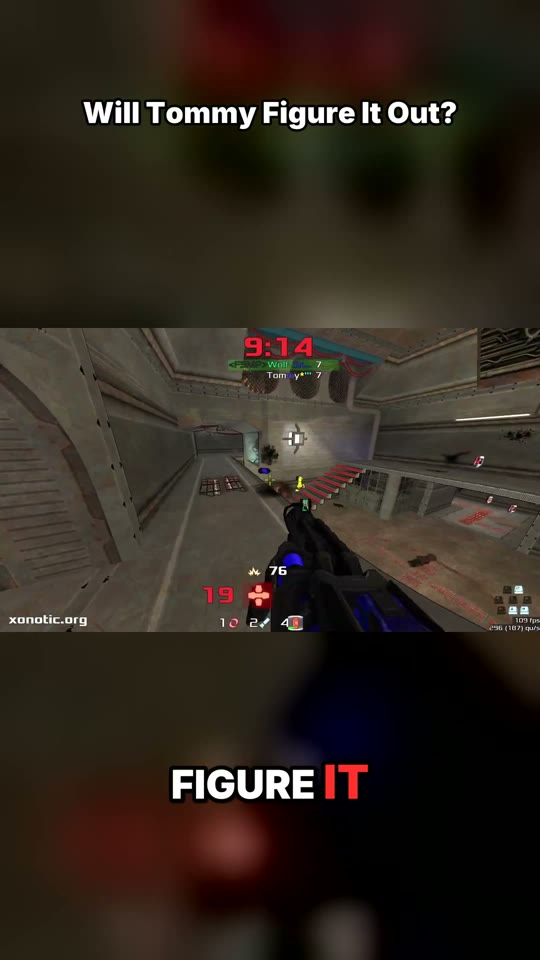
We gave Reel Stack an 11-minute match of Xonotic (a free, open-source shooter) with live commentary, using the Whole frame layout and Beast captions. These are three of the clips it made, untouched: the whole screen and HUD stay in view, and the hook title sits above the game.
Made on 23 Nov 2026. This video has commentary, so the clips come from speech; no-talking mode is for videos with almost no words. Source: “Throwback Comeback! | Wolfy vs Tommy | Darkzone | Xonotic Duel Commentary” by MxCrab (Creative Commons Attribution).
Why it fits gaming streamers
Doesn't need talking
No-talking mode means a quiet gameplay video gives you clips instead of an error.
Built for long videos
Pick any part of a long stream; only that part counts against your plan.
Scores you can trust
Clips without speech are marked as harder to judge instead of getting a confident high score.
What it can't do yet
Worth knowing before you start.
- Kick VODs don't download right now (Kick clips do).
- Moments in no-talking mode come from sound, scene cuts and Most replayed, not from what happens in the game itself, so a silent clutch play with no audio spike can be missed.
- Reel Stack doesn't read Twitch chat.
Which layout should I use for gameplay?
Does “Download without audio” cost an extra download?
Ready to 10x your short‑form video output?
Paste a link or upload a file. Reel Stack finds the moments worth posting and turns them into captioned TikToks, Reels and Shorts.